| |
| META TOPICPARENT |
name="MuSunGroup" |
-- PeterWinter - 30 Jul 2008 |
| |
- Register online for the DUO (digital user office) service at PSI. The registration can be found at the DUO webpage
 . You might want to bookmark this page as it could be needed more often later on. During the registration process you are required to fill in your personal data. The PSI facility mainly used should be the SmuS (Swiss Muon Source). . You might want to bookmark this page as it could be needed more often later on. During the registration process you are required to fill in your personal data. The PSI facility mainly used should be the SmuS (Swiss Muon Source).
- Once you have you're registered, login via the DUO login page.
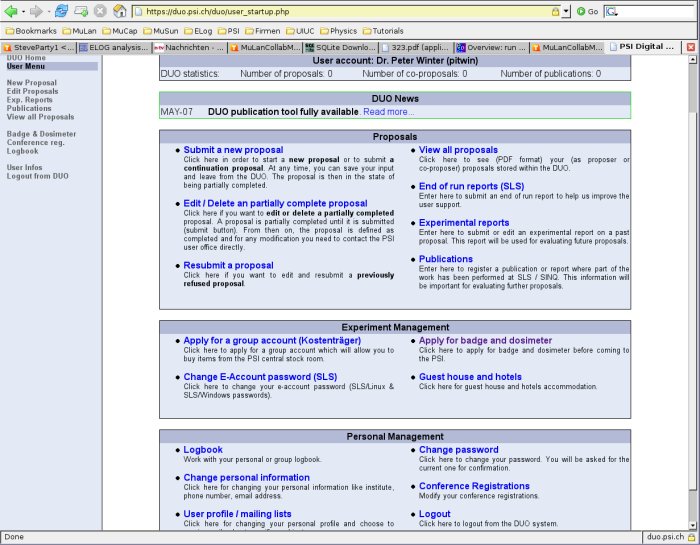
- Logged in, you should end on your personal DUO home page. I have taken a snapshot of what it looks like:
|
|
<
< |
- To start the visa process, you should follow the link 'Apply for badge and dosimeter'. Fill in the required data and submit it.
|
>
> |
- To start the visa process, you should follow the link 'Apply for badge and dosimeter'. Fill in the required data and submit it. As local contact person, you can fill in my (Peter Winter) name. If you are asked for the grant number of the experiment, you can use these:
- MuSun: R-08-01.1
- MuCap:
- MuLan:
|
| |
- Once that is done, the PSI user office should contact you and tell you which required documents they need based on the length of your stay. Follow their instructions.
- If you have any questions concerning the procedure or during your application process, feel free to contact me (
 Peter_Winter) and I will try to help. Peter_Winter) and I will try to help.
|